We’ve just added two new features that make working with GPS tracks in Tripline much more flexible—especially when you need to refine an existing trip instead of starting from scratch.
1. You can now insert GPS Tracks into existing trips
In our initial GPS release a few weeks ago, GPS imports always created a brand new trip. Now you can import a GPX or KML file directly into an existing trip while you’re editing it.
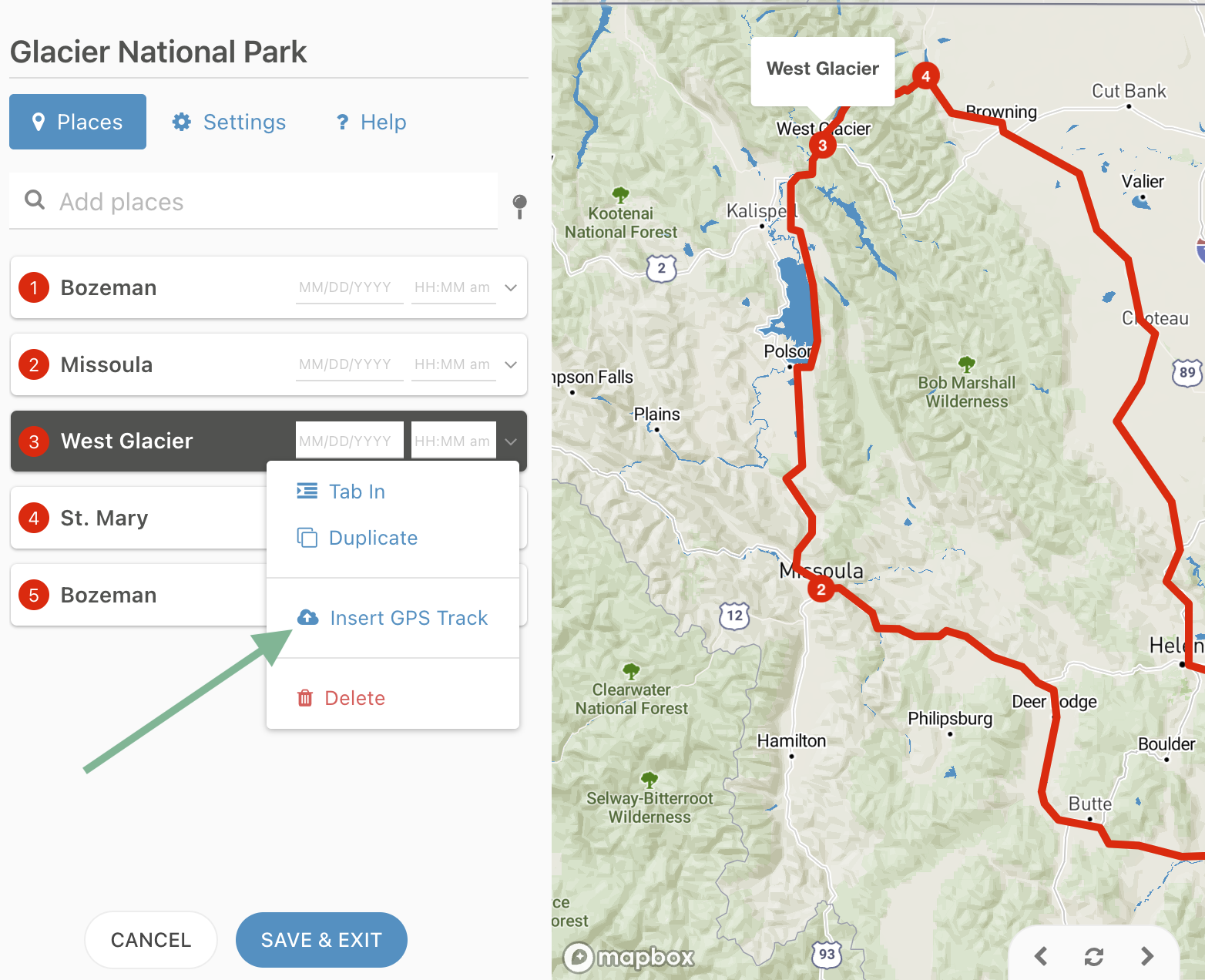
Simply choose a waypoint in the editor, click Insert GPS Track, select your options and Tripline inserts your track right into your existing timeline.
You can insert multiple GPS tracks into a single trip, and each one can be augmented with additional waypoints, stories and photos independently.
Inserting a GPS Track into an existing trip
2. You can now split travel paths to add new waypoints while preserving your recorded route.
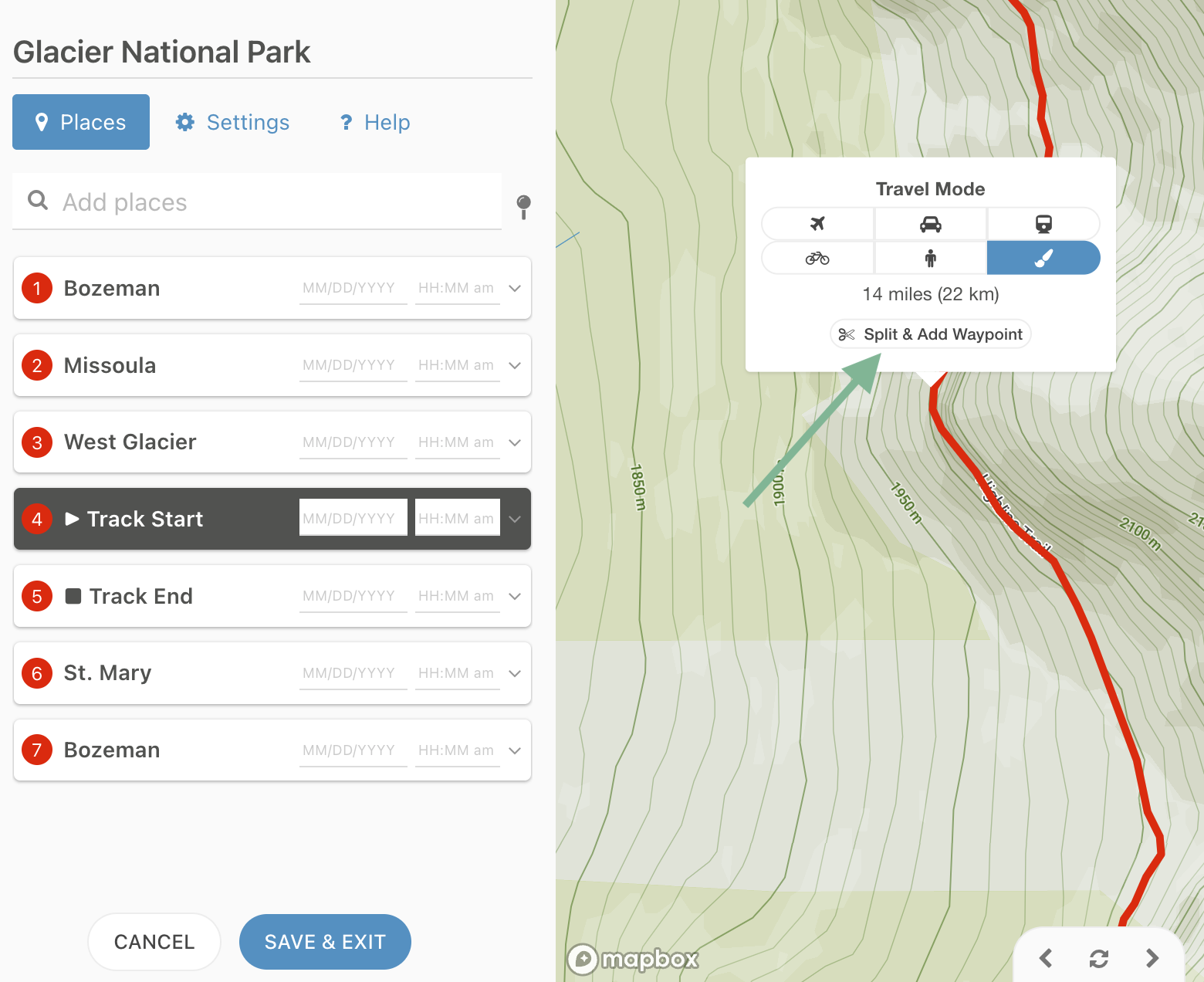
Sometimes your recorded GPS tracks don’t have all the waypoints you want. Now you can add them in Tripline. Just click anywhere along an existing path in the editor and select the Split & Add Waypoint option to automatically insert a new waypoint at that location.
Tripline preserves the recorded path by seamlessly splitting it into two connected segments—no redrawing required. And the path stays intact even if you delete an added waypoint.
This makes it easy to add vistas, campsites, restaurants, fishing spots, or any other points of interest exactly where you want them.
Splitting an imported track to add a new waypoint
These new features help Tripline grow with your adventures, so you can preserve more memories and tell better stories.
Whether you’re importing a recorded hike, combining GPS data with an existing itinerary, or fine-tuning a custom route, editing is now much faster and more intuitive.
Both of these features are only available to Tripline Pro subscribers. If you don’t have a Pro account yet, Upgrade to Pro to get started.
If you’ve ever recorded a hike, bike ride, road trip, expedition or other adventure with a GPS app or device, you can now bring it into Tripline in seconds.
Tripline now supports importing GPX and KML files.
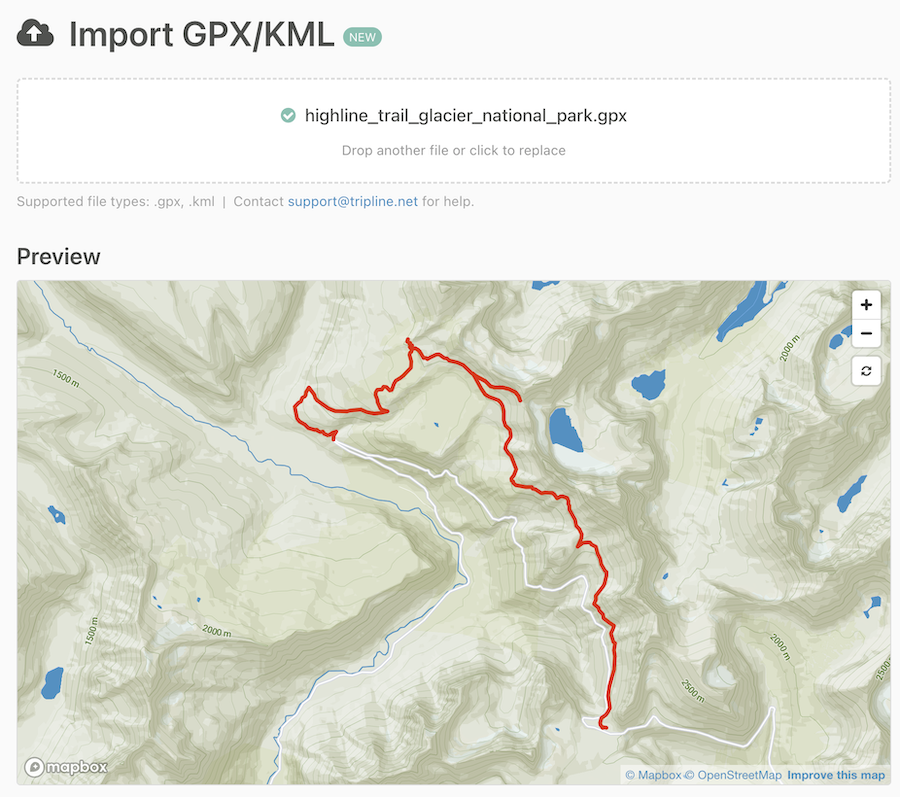
Simply upload your file, preview the route, select your options, and Tripline automatically creates a trip complete with:
Your detailed GPS track
Waypoints from your file
Original travel dates and times (when available)
A Tripline story ready to customize and share
Whether your files come from Gaia GPS, Strava, CalTopo, Orux, Garmin, AllTrails or dozens of other apps, importing your adventures has never been easier.
Importing a GPS Track from a .gpx file
Once you’ve previewed your track, you can select your import options (tracks, routes, waypoints), choose your map style and create your trip. For more details, read through our help post on the subject.
This is just the beginning. We’ll continue improving the importer with additional features and workflow enhancements based on your feedback.
This feature is only available to Tripline Pro subscribers. If you don’t have a Pro account yet, Upgrade to Pro to get started.
Hi folks, Byron here with a big announcement: We launched subscriptions for Tripline on Saturday, January 10, 2026. You’ll now need a subscription to create new trips and access many of our key features. This is a major change to the platform so I’m going to walk you through the details.
A bit of background
I first launched Tripline in 2010, just over 15 years ago. Since then, more than 1.6 million people have signed up and created more than 1 million trips, criss-crossing the globe with their stories. Every day still, many thousands of people are using Tripline from all over the world and it’s inspiring to see. I’ve been committed to the vision wholeheartedly from the beginning and have continually made improvements over time, including a major release of new features in April 2025.
I’ve also paid for everything myself. Things like AWS hosting infrastructure, CDN services, mapping platforms and more. To-date I’ve invested a substantial amount of my own money along with countless hours of time, all because I believe in the product and I want to keep it growing. The ads I run on Tripline and your Patreon contributions have helped offset a portion of operating costs, but they’re not nearly enough to fund product development. So my goal with the launch of subscriptions is to generate enough revenue so I can re-invest it in enhancing the product for the future. There’s still a lot to be done.
I’m telling you this so you understand that Tripline isn’t a venture-backed company with a big team and money to burn. It’s just me, the creator, looking for a good way to fund the continued development of the product. That’s my only goal, and I believe a subscription model is the best way to do it. I hope you come along with me.
How subscriptions work
There are three tiers:
Tourist: A free tier with limited capabilities that will allow people to check out the product, create private trips etc.
Pro: A paid tier (not very expensive) that enables most Tripline features, including the ability to add fellow travelers. Notably, the people you add don’t need to be pro users. This means only one person in a group needs to have a Pro subscription to take advantage of Pro-level features for a trip.
Guide: A paid tier designed for travel businesses. It’s a bit more expensive, but it opens up SEO benefits, the ability to embed maps on external sites without ads, and removes Tripline branding on your embeds.
You’ll need to choose your tier before you create anything new, and if you choose the free option, many of the features you’re used to seeing will be unavailable. I’m not going to do anything dramatic like delete all your trips if you don’t subscribe, so you’ll have time to choose without too much pressure.
You can click below to activate your subscription:
Many educators around the world are using Tripline with their students for class projects. I strongly believe that this makes the world a better place and I’m committed to supporting that. So, I’ve developed a process to grant educators special access to Tripline at no cost. You can read more about that here.
Patreon supporters
If you were supporting Tripline on Patreon (thank you), I’ve canceled all future contributions, but I’ll keep your special user status in place until you’ve had a chance to make your subscription choice. That means everything will stay as it is now, and I’ll email you directly before I make any changes that would impact you. I’d still recommend subscribing as soon as possible to avoid any issues.
What comes next?
If you’re active on Tripline, you’ll see the changes right away on both the website and in the mobile apps. Along with the upcoming Subscriptions release, I’m also including a few feature updates from the backlog:
Improvements to place search
Sub-places (indented waypoints)
Ability to edit waypoint info in the editor
Enhancements to map styles
Better photo experience in the mobile apps
And then the fun part. Assuming I see good subscription numbers, I’m going to start working on some more impactful updates, including an investment in rebuilding our mobile apps from the ground up. Right now my short-list looks like this:
Completely rebuilt mobile apps with an exciting new set of features
Better support for trips with 100+ places
Better visualization for dates (calendar view etc.)
Additional map customization options
Improvements to map animation
Internationalization
Conversion-focused enhancements for travel businesses
As part of this longer term plan, it’s likely that I’ll be making some fundamental changes to the underlying architecture (modernizing infrastructure etc.), and I’ll be bringing on additional engineers. That’s really where the costs come in, and why I need to make this change now. It’s all about the future of the product.
If you want to get in touch or have any questions, please send an email to support@tripline.net (I’m the one looking at that inbox) and let me know your thoughts.
Hi folks. Byron here with an overview of our new release that we launched on Saturday, April 19. No doubt you’ve noticed quite a few changes to the layout of the site and mobile apps, but there’s a lot more that we updated behind the scenes. Here’s an overview, starting with the most visible changes:
New layout for trips with banner images too!
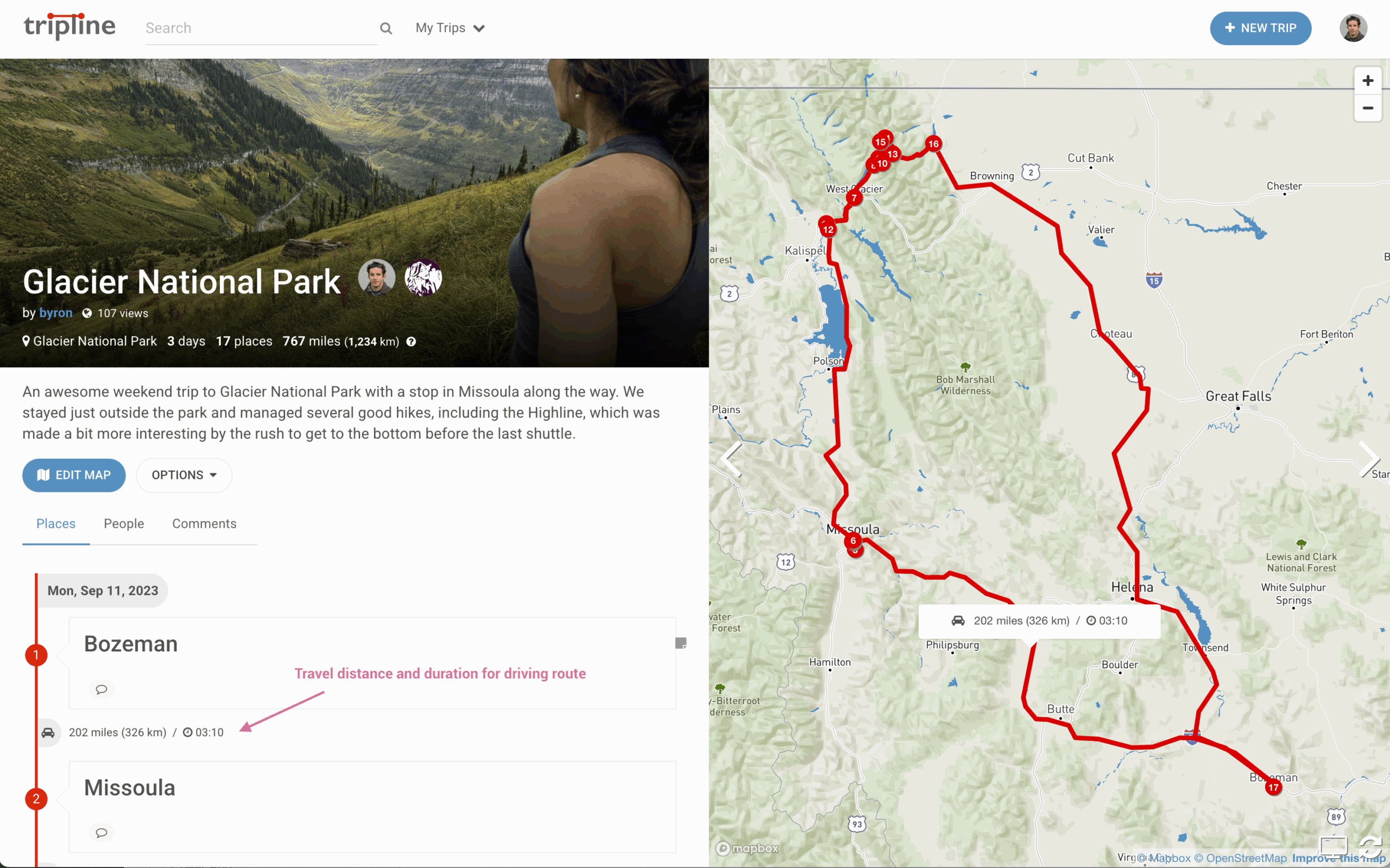
Based on a lot of user feedback, we changed the trip page to a side-by-side layout and added the ability for creators to upload banner images. The new layout means you can scroll through your list of places and the map will stay visible. You can also click on the point numbers to zoom to a particular place in the map.
New side-by-side layout with banner image
To upload a banner image, click the gear icon to edit trip settings and choose a file to upload. We think 16:9 images work best, but any shape will cover the banner area. Ideally, the subject you want to be visible should be in the center of the image.
Also, banner images will automatically become your trip thumbnails.
Easy drag & drop photo reordering
It’s now super simple to reorder your photos (or move to a different waypoint). Head over to this post to see it in action.
True travel distances with duration estimates
We’ve added true distance calculations for all routes, and estimated durations for driving, transit, walking and bicycling routes. Distances will be added for all new trips, and you can edit your old trips to set distances for each path by clicking on the line in the map editor and choosing a travel mode. For more detail on how it works, check out this post.
True travel distances with estimated duration
The overall trip distance is a sum of the individual route distances, so it will reflect all of your changes instantly.
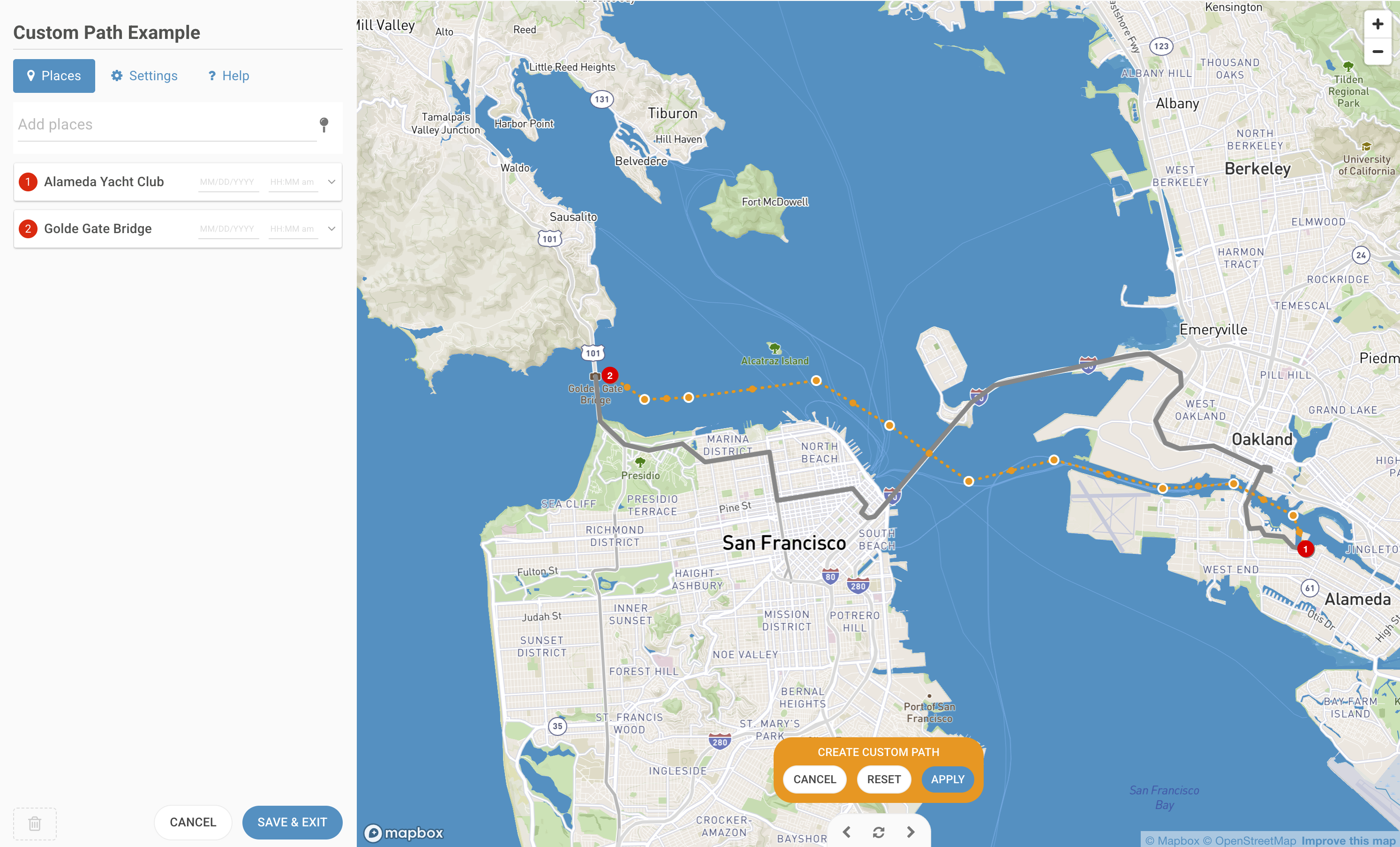
Improved custom path creation
We updated the custom path feature to be easier to use and allow more accurate path creation. Here’s the new interface:
We now support emojis in most places where you can enter text. This includes the following:
User bios
Trip descriptions
Place titles
Place descriptions/stories
Comments
For technical reasons, we don’t allow emojis in trip titles. We know you want them, but we had to draw the line somewhere. : |
New maps platform
We updated our core mapping system to Mapbox GL, which is a significant upgrade. Even though things look pretty much the same (for now), Mapbox GL has many more features and much better performance. This is a new foundation for us to offer more advanced customization options in the future.
New verifications system
We added a new system to handle email verifications, password resets and invitations. Part of this is requiring all users to verify their email addresses in order to create new maps. We know it’s a bit of a pain, but it’s important for us to maintain platform integrity and something we should have done a while ago.
This new system also makes it much easier for you to invite people to join your trips by email. Now, all they have to do is click on an invitation link.
To read more about how it works, check out this post.
Google Sign In
You can now connect your account to Google and use Google Sign In to log in to Tripline. If you already have a Tripline account, go to https://www.tripline.net/myaccount and choose Google [Sign In] to link your account. You’ll then be able to sign in with Google any time.
Infrastructure improvements & bug fixes
We made a bunch of updates to the Tripline infrastructure and fixed a lot of bugs. We’re going to be making quite a few updates to the product this year, so we spent some time getting some of the older parts of our infrastructure up to date
More in the backlog
We’re already hard at work on more enhancements, so stay tuned over the coming months. Some of the things that are high on our list are:
Improvements to place search
Sub-places (indented waypoints)
Ability to edit waypoint info in the editor
Enhancements to map styles
Better photo experience in the mobile apps
Longer term
KML/GPX track imports
Better support for trips with 100+ places
Automatic trips from photos
Completely redesigned mobile apps
If there’s something you’d like to see on this list, or if you have any questions, please send an email to support@tripline.net and let us know.
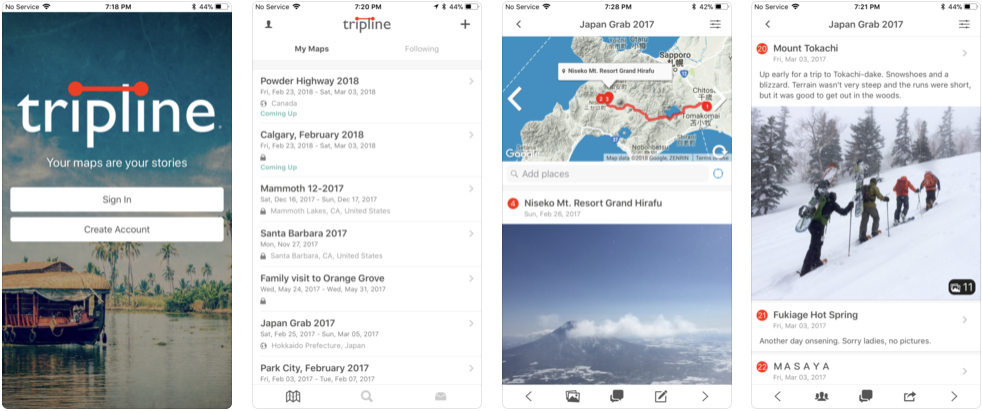
Byron here with an exciting announcement. We’ve just launched brand new apps for both iOS and Android! Both are available for free on the app stores, links below:
The apps are full-featured, including route animation, photos, comments and the ability to add people as travelers and followers. Speaking of photos, we’ve also implemented a new photo upload process that’s faster than the old system and displays your photos in much higher quality.
My favorite thing about the apps is how each trip starts out as a useful itinerary and becomes a beautiful, Instagram-like feed full of memories that you and your fellow travelers can keep forever. And you retain the context of each individual trip, which I think is is so much better than cluttered, post-based feeds.
Sure, not everyone is a fan of structure, but Tripline was built for people who really care about the trips they take and want to preserve the journey as accurately as possible, both for reminiscing and for future reference. I really believe that an organized presentation is the best way to do that. The challenge is making it simple and fun…I think these apps are a big step towards that.
We have a lot of enhancements planned for the apps in the near future. There are a ton of features that you’ve been asking for forever and we’ll be implementing some of the big ones in the coming months. Notably, distance & duration to make road-trip planning much easier, and better conversational capabilities between travelers…also to help you plan better. And lots more.
As always, if you run into any problems or want to send in a feature request, just email support@tripline.net. We’ll try to get back to you as soon as we can.
Now, go install the app…and don’t forget to leave a review on the app store!